Internet Cafe 98 Early Game Upgrade Priority
A timed S–C plan for your first PC, first room, and the research loop that unlocks everything else.
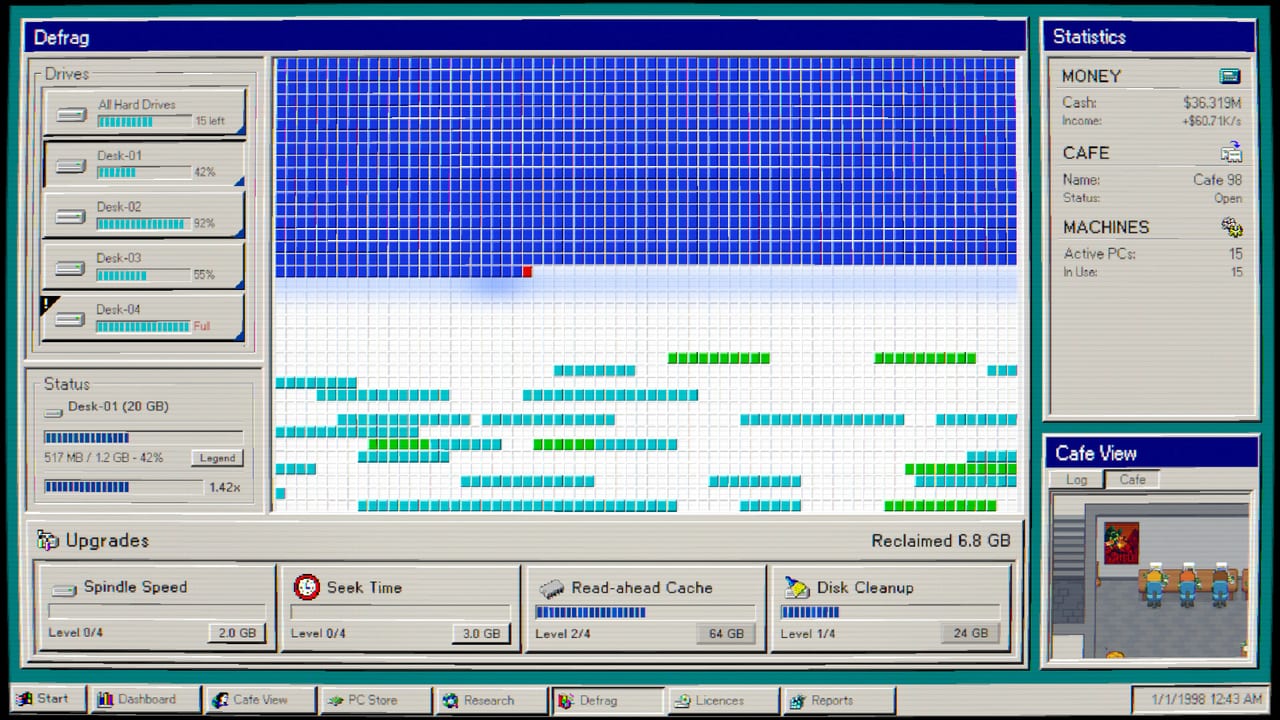
The early game of Internet Cafe 98 decides whether your Windows 98 desktop feels like a cozy grind or a click treadmill. You start with one trash PC, a weak dial-up line, and a tutorial that expects you to upgrade parts before you rush the cafe open button. This page turns that lesson into a clear priority list for the first hour and the first room, then hands you off to mid-game systems covered on the Tier List Hub, PC Building, and Research guides.
If you are brand new, skim Getting Started first, then return here with cash ready. Keep the Upgrade Priority Checklist nearby so you can tick boxes while the CRT hums.
Priority legend for the opening run
- S — Immediate: buy on unlock if you can afford it.
- A — Same session: buy after S items in the current phase.
- B — After stability: buy when the first desk earns cleanly.
- C — Defer: ignore until the first room is healthy.
These ranks match the hub’s category tiers but zoom into order inside the first room. A part can be S early and only A later once its job is done.
Phase 0 — Tutorial clicks before you open
Do not treat the tutorial as a skippable slideshow. GrindWill’s July tutorial and early-game patches exist because players who opened the cafe with a nearly stock machine faced hundreds of empty clicks. Follow the task list, and between prompts:
- S — Mouse, keyboard, and basic peripherals once they appear. Developer notes from the demo era pointed at roughly a few dozen clicks to the first peripheral upgrades when you do not race the open button.
- S — Motherboard / system board as soon as it is in budget. It gates cleaner component scaling.
- S — CPU and RAM on the starter PC before cosmetic case chasing. Preview income and quality in the builder every time.
- A — Storage and case when they raise PC quality enough to matter for the next tutorial gate.
- C — Fancy display adapter spikes if they cost more than opening readiness and leave CPU/RAM behind.
Open the cafe only after the tutorial’s upgrade expectations are met. A slightly slower open with a stronger first machine beats a fast open that needs hundreds of clicks to recover.
Phase 1 — First hour after the doors open
Your goals for the first hour are simple: raise income per interaction, stop the line from choking, and start research.
S tier in the first hour
Network / internet capacity. Customers will complain in chat about lag and disconnects. Early patches moved internet capacity earlier in the curve for a reason. Spend here before you fantasize about a second desk.
Research window uptime. Generate research points, decode data banks when available, and unlock the next hardware or systems node. Research is how a single beige box becomes a franchise later; leaving it closed is an invisible softlock on your growth rate.
CPU and RAM refreshes on the flagship desk whenever a new tier is cheap relative to your current click or idle income. Always compare parts in the builder instead of buying the most expensive label.
A tier in the first hour
Coffee machine stock. Happy customers stay longer and spend more. Restocking coffee is usually cheaper than a bad hardware impulse buy and pairs with the habits in Customers.
Hard drive cleaning and lost-file digs on the machines you already own. These boosts stack with desk count, so starting the habit early pays for every future PC.
Monitor and GPU steps that the builder shows will raise quality and income without bankrupting network or research budgets.
B and C in the first hour
B — Second desk only after the first PC’s income feels clearly better than the tutorial baseline and research is producing. Two weak PCs create twice the complaints.
C — Room expansion, franchise map, and licence binge. Knocking through walls and laying continental cables are mid-to-late fantasies. Licence discs for the ten retro games are delightful but not your income backbone yet.
Phase 2 — Filling the first room
Once the first hour loop is stable, shift from “survive clicks” to “fill seats with researched builds.”
- Clone a known-good parts mix for desks two and three instead of improvising worse configs. Use PC Building for assembly habits.
- Keep network one step ahead of seat count. Adding desks without bandwidth recreates the early chat meltdown at larger scale.
- Schedule research between seating buys. A new unlock that cuts part cost or raises employee research speed can be worth delaying a desk.
- Run coffee + drive cleaning as a room-wide routine every time you return from AFK or a research claim.
- Only then plan the first knock-through using Expansion. Expand when current desks earn well; more space means more upkeep.
First-room priority table
| Order | Upgrade | Tier | Why |
|---|---|---|---|
| 1 | Starter peripherals + board | S | Unlocks sane part scaling |
| 2 | CPU / RAM on desk one | S | Best early income per dollar |
| 3 | Internet capacity | S | Stops wasted hardware spend |
| 4 | Research nodes | S | Unlocks the real tech tree |
| 5 | Coffee stock | A | Session length and retention |
| 6 | Drive clean / lost files | A | Multiplies every desk |
| 7 | GPU / display balance | A | Quality rating without bankruptcy |
| 8 | Extra desks (cloned builds) | B | Throughput after flagship is strong |
| 9 | Next room | B | After stable local income |
| 10 | Franchise / licences binge | C | After home room is healthy |
Common early-game mistakes
Opening too early. If the tutorial still wants component upgrades, finish them. Demo feedback and developer replies repeatedly pointed at rushed opens as the cause of miserable click counts.
Buying a second trash PC. Capacity without quality spreads poverty. Upgrade, then duplicate.
Ignoring chat complaints. Customer messages are a free diagnostic for network, hardware, and comfort problems. Translate them using the Customers guide.
Saving all cash for expansion. Walls and new rooms do not research themselves. Keep a research buffer.
Chasing every retro game instantly. Play and stock titles when it helps retention or when you want a break; do not let licences replace S-tier spends.
How this ties to tools and patches
Work the same sequence as a living checklist on Upgrade Priority Checklist under Tools. When balance patches land — tutorial clarity in July, earlier internet capacity and clearer research shortly after, cafe view and macOS QoL in October, and the November 23 full launch — re-check whether network or research moved earlier in your personal curve. Summaries live on Updates and Launch Week Notes.
Official store, free demo (Steam app 4225170), and Discord links sit on the Links Hub. The demo remains useful for practicing this exact early order before you commit to the $6.99 launch build (or the 10% intro price through November 30, 2026).
Master the first room with this priority list and the rest of Internet Cafe 98 — from cleaned drives to global cables — opens on your schedule instead of the modem’s.
Frequently Asked Questions
Quick answers for cafe owners still learning the dial-up grind.
What should I upgrade first on the trash PC?
Follow the tutorial, then prioritize peripherals, motherboard, CPU, and RAM while previewing income in the builder. Do not open the cafe on a nearly stock machine.
When do I buy a second desk?
After the first PC’s income is clearly improved, network is not choking, and research is running. Second desks are B tier in the early game.
Is coffee really A tier this early?
Yes. Stocking coffee is inexpensive relative to hardware and keeps customers playing longer, protecting the upgrades you already bought.
Where can I watch a trailer while learning priorities?
This page embeds the official Demo Trailer from GrindWill. For store and Discord links, use the Links Hub.
How does this relate to the main tier list?
The Tier List Hub ranks categories for the whole run; this page sequences those ranks inside the first hour and first room.